
We skipped two updates. The reason: we were building the strategy builder, launching SpaceX pre-IPO options, standing up a real-time chat system bridged to Telegram, rewriting the order form, and preparing the entire frontend for mainnet. This post covers all of it.
Competition Wrap-Up
The April trading competition ended May 1. Two months of testnet trading, $2,000 in SYN prizes distributed across two monthly rounds.
Final standings for the April round: TurboLongSyn took first at +$904K with a 16.9x efficiency ratio. The runner-up posted +$888K at 19.5x, the highest capital efficiency on the board. Third place finished at +$714K. The top 10 all cleared +$245K in profit.
Across both competition months, 380+ wallets traded on the platform. Most of the volume came from a core of ~70 active traders who stuck around for more than a few days, with a long tail of bot-wave wallets that placed a single trade and never returned.
The testnet competition is now paused. The next competition will run on mainnet.
Tl;dr
- SpaceX (SPCX) pre-IPO options are live on testnet. The first pre-IPO option in DeFi. Expiries capped at the June 12 IPO date
- Strategy builder with 1-click templates for straddles, strangles, verticals, iron condors. Advanced mode with strike range controls and sell-leg strategies
- Trollbox: desktop chat with a full Telegram bridge. Media, GIFs, reactions, replies, typing indicators, command cards
- New order form: review step, slide-to-submit on mobile, redesigned multi-leg entry, unified form validations
- Profile images with upload, crop, and import from Twitter or Telegram
- RPI (Retail Price Improvement) auction routes single-leg orders through competing market makers before hitting the book
- Agent key management with a revoke panel and overage notifications
- Mainnet chain config shipped. The entire frontend now switches between testnet and mainnet via a single configuration change
- Options chain polish: position dot indicators, DTE labels, break-even arrows, sticky mark rows across all views
SpaceX Pre-IPO Options
You can now trade options on SpaceX (SPCX) before the company goes public.
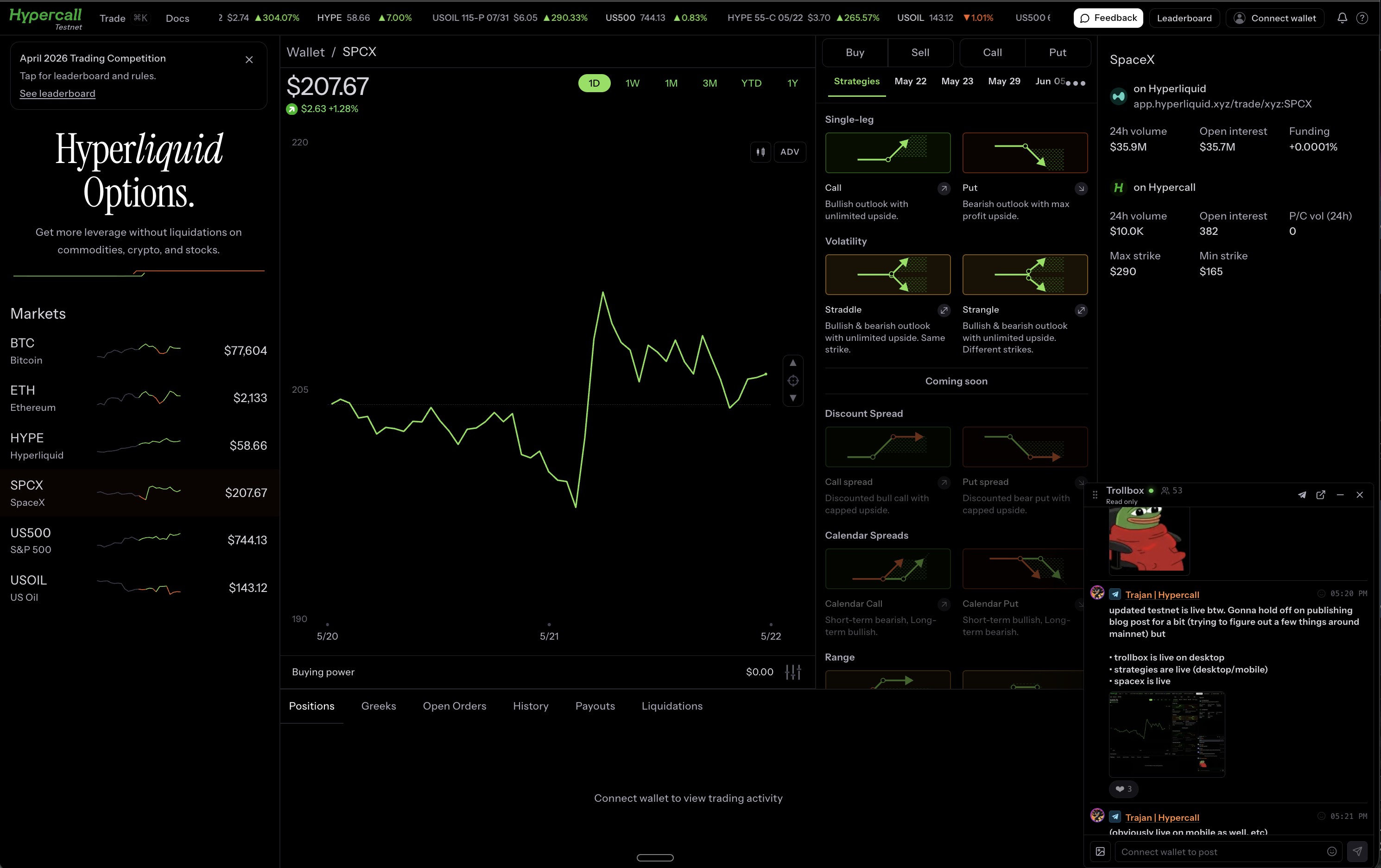
This is the first pre-IPO option contract in DeFi history. You can express a view on SpaceX’s valuation before a single share trades on a public exchange.
All SPCX expiries are capped at June 12, the expected IPO date. No point trading options past the event they reference.
Strategy Builder
The options chain now has a strategy builder. Instead of manually clicking individual legs, you select a strategy type and the builder configures the legs for you.
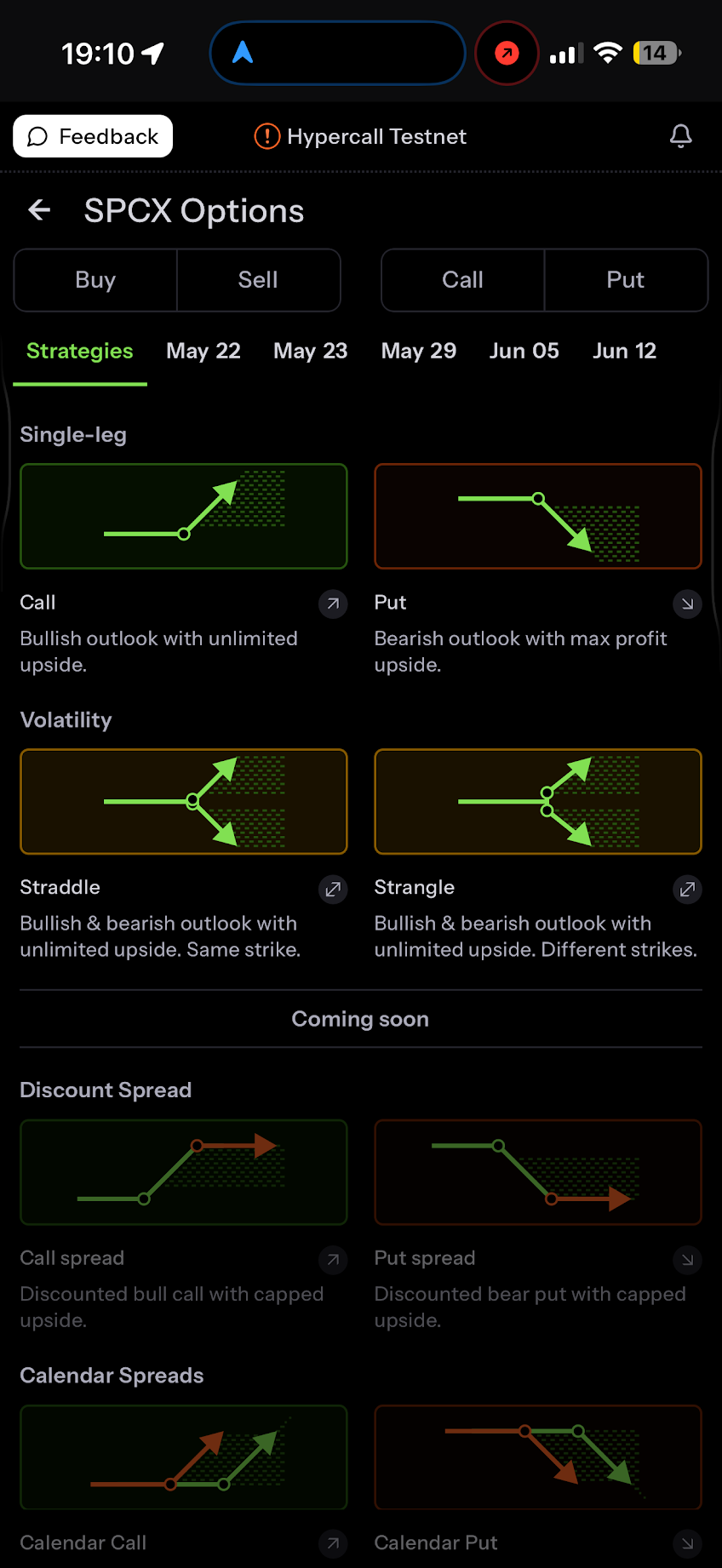
1-click strategies cover the common structures: straddles, strangles, vertical spreads, iron condors. Pick one from the gallery, choose your expiration, and the legs populate automatically. Each strategy shows a visual preview of its payoff shape before you commit. Per-leg quantity ratios carry through to the RFQ sizing and the order form.
Advanced mode adds strike range controls, a far expiration dropdown for calendar strategies, and sell-leg strategy construction. The gallery distinguishes between available and coming-soon strategies.
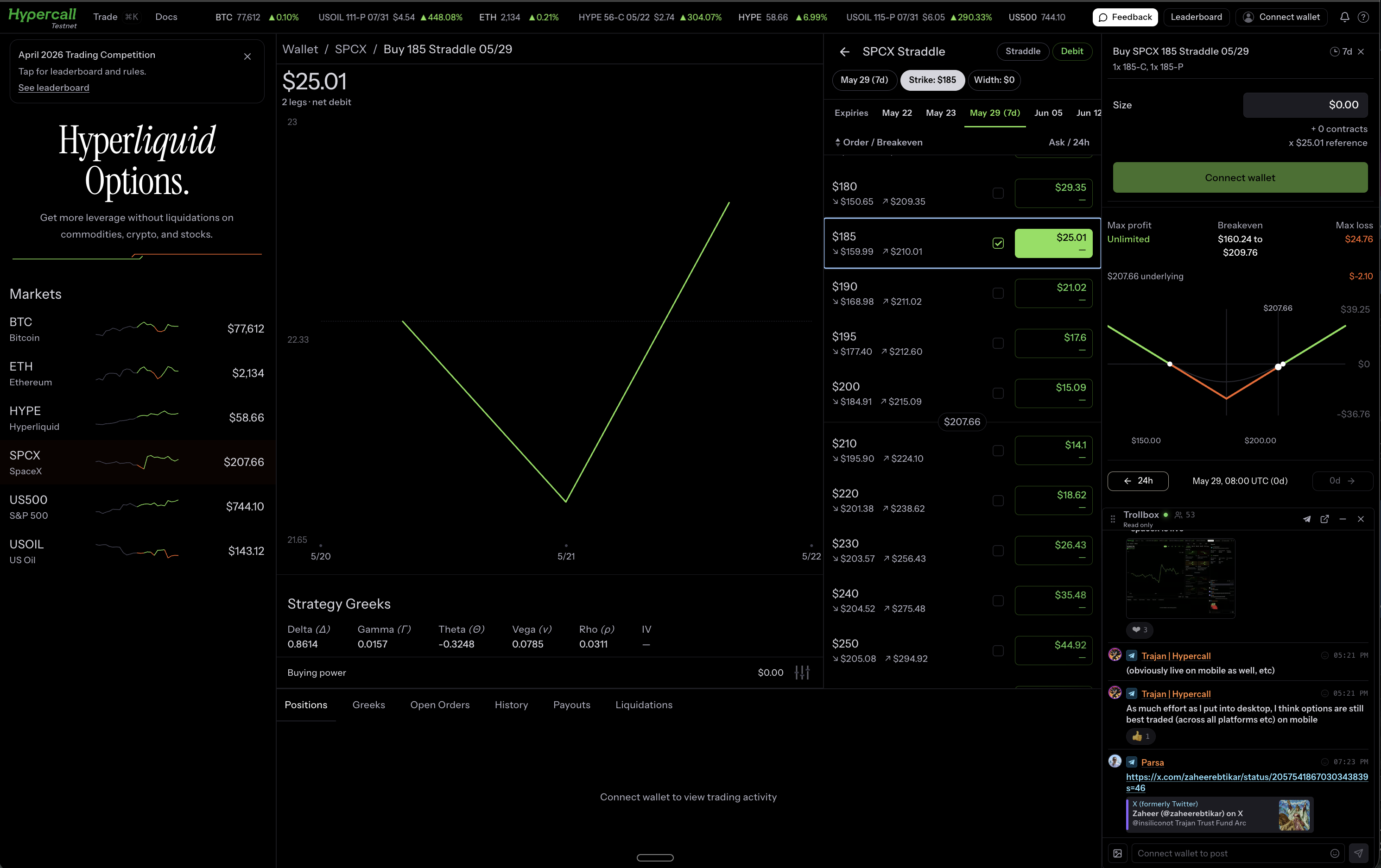
Strategy headers display badges showing the strategy type and whether the structure is a debit or credit. Multi-leg position labels are smarter now: when all legs share the same underlying and expiration, the label drops the redundant info and shows a compact name.
Visual pills on the options chain mark your selected legs, grouped by side. Sticky mark rows persist across the chain view, the strategy builder, and the spread/width views, so the current mark price is always visible while you scroll through strikes.
Trollbox
A draggable chat panel now sits on the desktop layout. Open it with the nav icon or a keyboard shortcut.
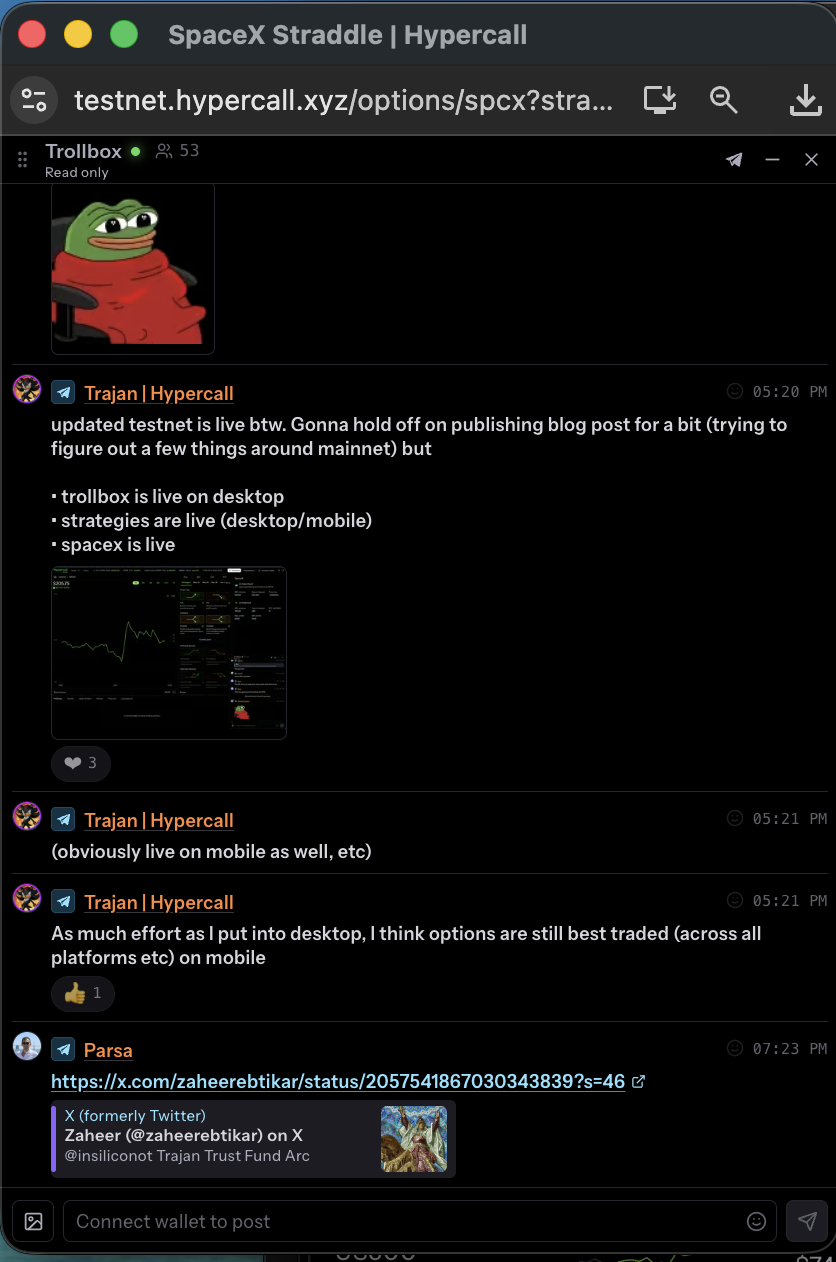
The Telegram bridge is the key piece. Every message posted in the Trollbox relays to the Hypercall Telegram group, and vice versa. Reply threading, reactions, display names, and avatars all sync both directions. If someone drops a chart in Telegram, it shows up in the web chat. If you react with an emoji on the web, it appears in Telegram.
You can link your Telegram account to your wallet directly from the Trollbox header. Click “Link TG,” get a one-time code, DM it to @hypercall_trollbox_bot, and the accounts are paired.
Media support covers images, video with auto-generated thumbnails, GIF search, and arbitrary file attachments. Everything is edge-cached globally, so loading is fast regardless of where you are. While media loads, a blurred color placeholder renders instead of a layout shift.
Command cards render in both directions. Share a trade or position in the Trollbox and it shows as a rich card with instrument details, greeks, and a link. In Telegram, the same card appears as a generated image with a caption.
Trollbox settings include a visibility toggle (On/Hidden segmented control), and the theme integrates with the platform’s dark/light modes. Phishing-pattern URLs are filtered automatically, and external links show safety warnings.
Order Form
The order form got a full rewrite across mobile and desktop.
Review step on mobile. After sizing your order, a new review screen shows the complete order summary before submission. You can tap Edit to go back and adjust without starting over.
Slide-to-submit. Confirmation is now a slide gesture instead of a tap. Harder to fat-finger a trade.
Inline validation. Pay validation with min/max warnings shows directly in the footer as you edit. The submit button disables when validation errors exist. Dollar sign prefixes on price columns throughout.
New multi-leg form. The desktop and mobile multi-leg order entry was rebuilt with per-quote expiry countdowns, slippage messaging, and an accept-best-quote flow. Legacy single-leg RFQ mobile components are gone.
Quick actions redesigned. The quick option selection grid adapts its column count dynamically. Active options highlight in the trade’s direction: green for buys, red for sells. Selection clears automatically when the inline flow moves to the size step.
Profile Images
Upload a profile picture from account settings. The editor gives you a circular crop with pan and zoom, and validates file type and size before upload. If you have an avatar on Twitter or Telegram, import it with one click.
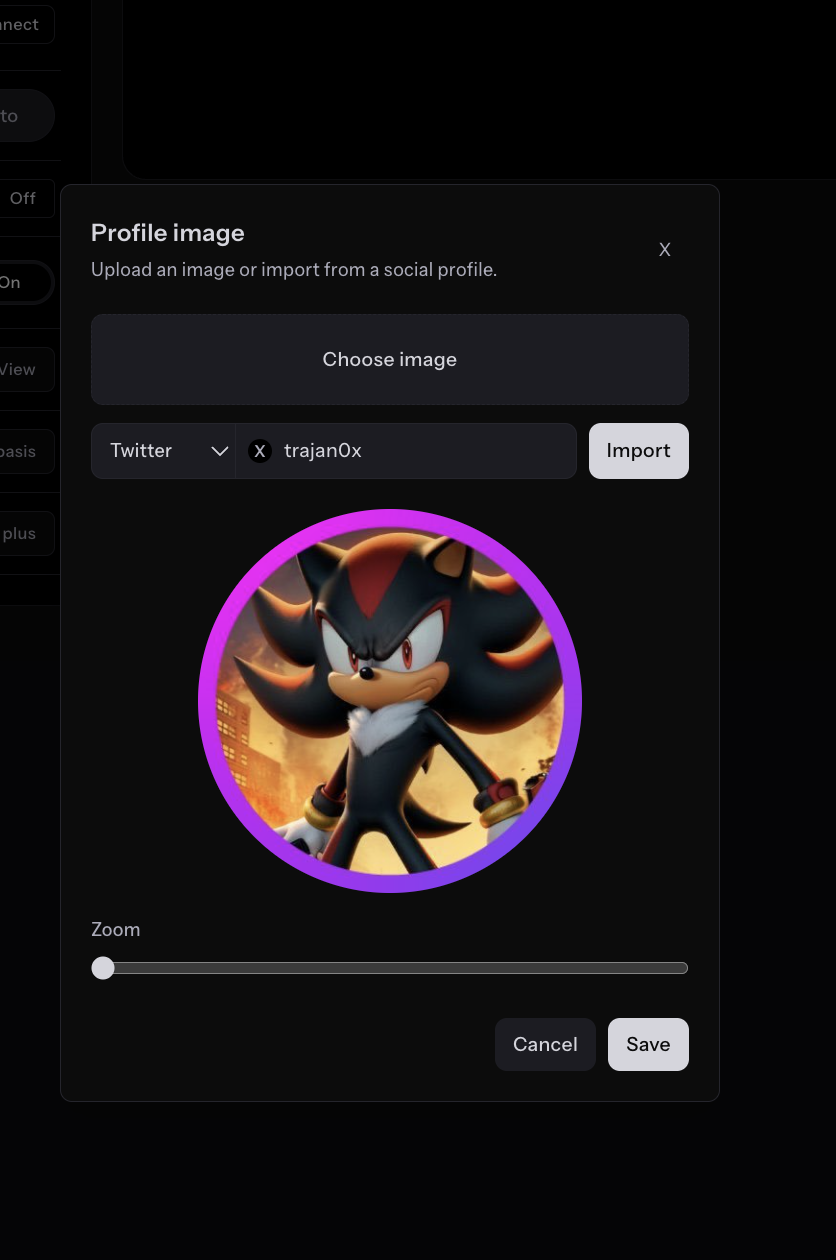
Profile images appear in the desktop nav chip, account settings, the leaderboard, member pages, and the Trollbox.
Users without a profile image get a deterministic procedural avatar that stays consistent across sessions instead of changing randomly.
Retail Price Improvement (RPI)
RPI adds a price improvement auction for single-leg orders. When you submit an eligible order, active market makers receive your order parameters and compete to beat the best book price. If a market maker clears the minimum improvement threshold, you get filled at their price. If nobody bids, your order falls through to the orderbook as a normal limit order.
You see this as “Finding best price…” in the order flow. RFQ handles multi-leg strategy packages. RPI handles single-leg orders. Together they cover the full routing spectrum.
Agent Key Management
A new settings panel shows your active agent keys with a two-step revoke flow. If you accumulate more than 20 active keys, a warning notification appears in the notifications dropdown linking you to the settings page.
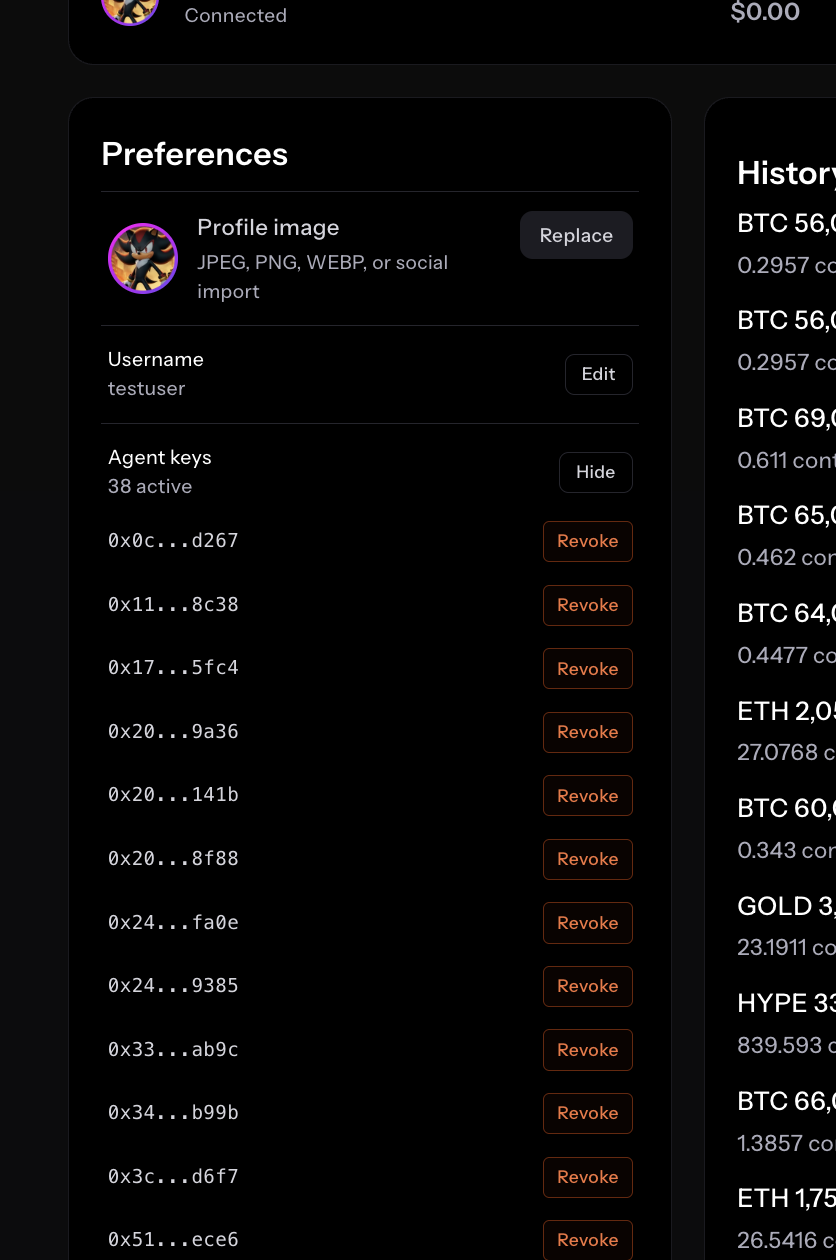
Trollbox visibility also moved into account settings as a segmented On/Hidden control.
Options Chain Polish
Several smaller changes that make the chain more useful:
Position dot indicators. Expiration tabs now show dots for expirations where you hold open positions. You can see at a glance which expiries have exposure.
DTE labels. Time-to-expiry labels appear on each expiration tab with urgent highlighting when contracts are close to expiry.
Break-even arrows. Visual directional indicators on the mobile options chain show break-even values for your position.
Sticky mark rows. The mark price row now sticks to the viewport across the options chain, strategy builder, and alternative strategy views (width/spread). No more losing track of ATM while scrolling through strikes.
Interval selector colors. Chart timeframe buttons dynamically match the chart’s performance tone: green when the asset is up, red when down.
Compact chart labels. Currency values on chart axes use abbreviated labels ($1.2m, $45k) instead of full numbers, preventing overflow.
Performance
Asset pages and the leaderboard load faster. We eliminated redundant data fetching that was happening on every fill and order update, removed duplicate network requests from hidden UI elements, and shifted more rendering to the server so pages arrive with content instead of loading spinners. The leaderboard in particular used to show an empty shell and then fill in on the client. It now renders with data on first paint.
Aesthetic Updates
Refined hero typography with adjusted font variation settings and letter-spacing. New asset source icon component for clearer venue badges. The live chart pulse got longer and smoother. Spacing, toggle, and button styling adjusted across mobile for consistency.
Mainnet Preparation
The entire frontend now switches between testnet and mainnet with a single configuration change. Wallet connections, signing, contract addresses, and UI copy all adapt automatically. The app is ready to run against mainnet contracts.
Looking Forward
SpaceX options are live on testnet. The strategy builder is shipping new templates weekly. Mainnet chain config is done. The pieces are converging.